
TL;DR
MetaMask has integrated Across. Swap and bridge tokens between major chains directly inside MetaMask, which automatically chooses the best route amongst 18 swap and bridge providers; Across powers selected routes when most optimal. As a developer, you can add the same native crosschain functionality in your own wallet or app using the Across Swap API.
Introduction
Let’s be honest. You probably open MetaMask more often than your email.
It is where you check your balances, sign transactions, and jump into whatever is happening onchain. You can even swap tokens between chains quickly, affordably, and safely, without ever leaving homebase.
Across is now one of the providers powering swap and bridge in MetaMask.
MetaMask: The OG Wallet for Crypto Natives
MetaMask is a household name in the crypto community. It has established itself as the onchain homebase for millions of crypto users around the world, paving the way for today’s booming hot wallet ecosystem.
It is self-custodial, multichain, and available on both desktop browser and mobile, enabling you to connect to dapps across chains with ease. Exciting native features are constantly being added, including native swap and bridge functionality provided by leading bridge providers. Across is one of those trusted integrations.
Across + MetaMask: The Upgrade You’ve Been Waiting For
We are bringing fast, cheap, and secure swaps directly to your doorstep.
You can now swap any token between your favorite chains—including Ethereum, Solana, BNB Smart Chain, Hyperliquid, Monad, and many more—directly within MetaMask’s native UI, powered by Across.
Across is among a select list of 18 swap and bridge providers powering native swapping. MetaMask automatically selects the best provider and route for you each time you swap.
How to Swap Tokens in MetaMask
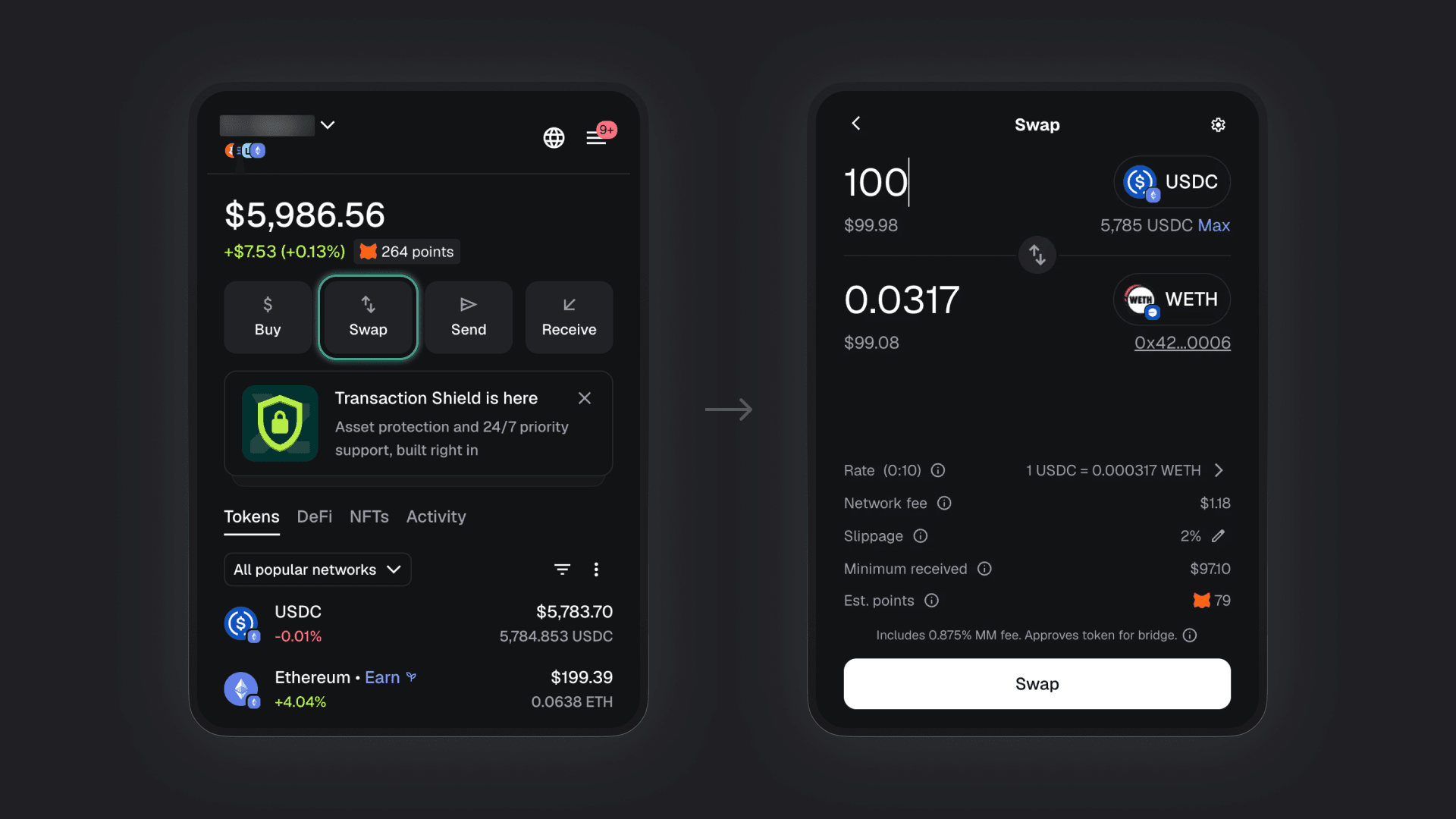
Here’s how you swap tokens in your Metask wallet:
Open MetaMask.
Click “Swap”.
Select your origin token and chain at the top of the swapping widget.
Select your destination token and chain at the bottom of the swapping widget.
Enter the amount you want to swap.
Review your quote.
Click “Swap.”
Boom. You’re done.
Check out MetaMask’s official user guide for more info.
No title. Add the screenshots side-by-side in a frame with a dark background. In the first screenshot, highlight the “Swap” button. Then add a subtle arrow pointing from the first screenshot to the second screenshot.
Developers: Add Swap and Bridge to Your Wallet or App
If you're building a wallet, app, or onchain experience, you can tap into the same underlying tech that powers swap and bridge inside MetaMask.
The Across Swap API makes it simple to embed fast, cheap, and secure crosschain bridging and swapping directly into your own interface. Your users will love you for it.
Start Swapping
We’ve brought industry-leading swapping and bridging to your favorite wallet.
If you already use MetaMask, you can swap tokens across chains right now. If not, MetaMask is available to download on both desktop browsers and mobile devices.
Join the Across community: